What Is MCP?
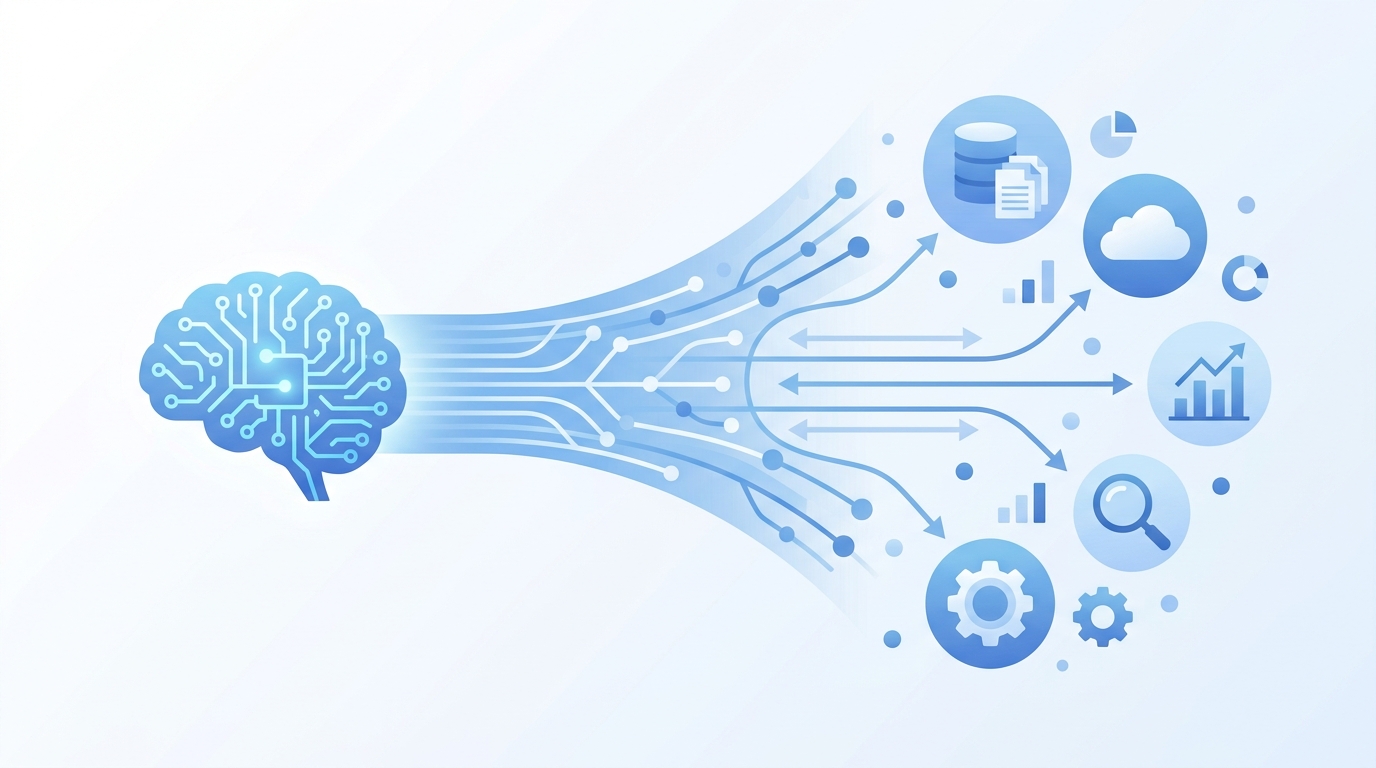
The Model Context Protocol (MCP) is an open, JSON-RPC-based protocol that standardizes how AI applications connect to external tools, data sources, and prompts. Think of it as a universal interface layer between a language model and the systems it needs to interact with.
Before MCP, every integration between an AI application and an external system was a bespoke N×M problem. If you built one agent that needed access to a database, a file system, and a SaaS API, you wrote three separate connectors. Add another model provider and you wrote three more. MCP collapses that matrix into a single standard: your AI application becomes an MCP host, each external system runs as an MCP server, and a thin client manages the 1:1 connection between them. (MCP Specification)
The ecosystem has moved fast. MCP downloads grew 8,000% in the five months after its November 2024 launch, reaching 97 million monthly SDK downloads by April 2025. DreamFactory’s MCP security statistics cataloged this growth alongside the security implications — making this a protocol every agent builder needs to understand, not just adopt.
Core Architecture: Host, Client, Server
The three components map cleanly to roles you probably already use in your agent stack.
Host — The AI application itself. This is where the model runs (or where a remote model is called). Claude Desktop, Cursor, and any custom agent application you build are all MCP hosts. The host runs one or more clients, orchestrates tool discovery, and interprets results.
Client — A lightweight connection manager. Each client maintains a single 1:1 connection to one server. If your host connects to five MCP servers, it runs five clients. The client handles transport, session lifecycle, and message routing.
Server — The capability provider. A server exposes tools, resources, and prompts to clients. Everything from a local file system to a remote Postgres database to a SaaS API like GitHub or Slack can run as an MCP server.
The transport layer offers two options:
- Stdio — Standard input/output for local processes. Zero network overhead. Ideal for development and single-machine deployments.
- Streamable HTTP — Remote connections for production deployments. As of March 2025, this transport requires OAuth 2.1 authentication, closing what was previously a significant security gap.
The protocol runs on JSON-RPC 2.0. Every interaction follows a request-response pattern, with optional server-initiated notifications for progress updates and prompts for sampling requests. (The 2026 MCP roadmap describes how these transport mechanics will evolve to handle horizontal scaling and load-balancer-aware session management.)
Every MCP server exposes some combination of three primitives. Understanding the distinction is critical — teams frequently misuse Resources for what should be Tools, and vice versa.
Tools are executable functions the host’s AI can invoke. This is where most MCP integrations live: a search_postgres tool that executes a query and returns rows, a send_slack_message tool that calls the Slack API, a run_test tool that executes a shell command and captures output.
Tools follow a strict lifecycle:
- Discovery — The host calls
tools/list to enumerate what the server offers.
- Invocation — The host calls
tools/call with the tool name and arguments. The server executes and returns structured results.
- Response — Results are returned as content blocks (text, image, or structured data) with an
isError flag.
Unlike traditional function calling, MCP tools are discovered at runtime. The server registers itself; the host learns its capabilities without any pre-configuration. This is why MCP is often called the “plug-and-play” layer for AI agents — add a new server and the tools appear automatically.
Resources
Resources are static context data the AI reads: file contents, database schemas, API documentation, configuration files. They’re designed for loading information into the model’s context window, not for real-time streaming.
Resources are addressed by URI — for example, file:///home/user/project/README.md or postgres://db/server/public/users?schema=true. The host calls resources/read to retrieve content. Some servers support resources/list to enumerate all available resources, and resources/subscribe for servers that want to push change notifications to the host.
The critical distinction from Tools: Resources don’t execute anything. They’re read-only context feeds. If your server needs to do something (write a file, call an API, run a query), that’s a Tool.
Prompts
Prompts are predefined instruction templates for recurring tasks. An MCP server can expose a code_review prompt that structures how the model reviews code, or a security_audit prompt that ensures consistent scanning patterns.
Prompts are the most underused primitive. They’re valuable for standardizing how agents approach common tasks, but most MCP server implementations skip them. If you’re building an agent for a team, prompts are how you codify best practices into the protocol itself rather than hoping individual prompts are consistent.
The Fourth Primitive: Sampling
Servers can request that the host’s LLM complete a reasoning step via sampling/createMessage. This is architecturally significant: it means an MCP server can invoke AI reasoning without owning its own model API keys. The tool offloads the LLM call back to the host, avoiding tight coupling to a specific provider. (Red Hat’s guide to MCP in agents covers this pattern in the enterprise context.)
Building an MCP Server: Concrete Example
Let’s build a practical MCP server that exposes GitHub repository information as tools and resources. We’ll use Python and the official MCP SDK.
from mcp.server.fastmcp import FastMCP
import httpx

# Initialize the server
mcp = FastMCP("github-repo-tools")

@mcp.tool()
async def get_repo_info(
    owner: str,
    repo: str,
    github_token: str
) -> str:
    """Get metadata for a GitHub repository."""
    async with httpx.AsyncClient(
        headers={"Authorization": f"token {github_token}"}
    ) as client:
        response = await client.get(
            f"https://api.github.com/repos/{owner}/{repo}"
        )
        response.raise_for_status()
        data = response.json()
        return (
            f"Repository: {data['full_name']}\n"
            f"Description: {data['description']}\n"
            f"Stars: {data['stargazers_count']}\n"
            f"Language: {data['language']}\n"
            f"Created: {data['created_at']}\n"
            f"Last Push: {data['pushed_at']}"
        )

@mcp.tool()
async def list_open_issues(
    owner: str,
    repo: str,
    github_token: str
) -> str:
    """List open issues in a GitHub repository."""
    async with httpx.AsyncClient(
        headers={"Authorization": f"token {github_token}"}
    ) as client:
        response = await client.get(
            f"https://api.github.com/repos/{owner}/{repo}/issues",
            params={"state": "open", "per_page": 10}
        )
        response.raise_for_status()
        issues = response.json()
        if not issues:
            return "No open issues found."
        lines = []
        for issue in issues:
            lines.append(
                f"- #{issue['number']}: {issue['title']} "
                f"(by {issue['user']['login']}, "
                f"created {issue['created_at'][:10]})"
            )
        return "\n".join(lines)

@mcp.resource("repo://{owner}/{repo}/readme")
async def get_readme(owner: str, repo: str, github_token: str) -> str:
    """Retrieve the README for a repository as context."""
    async with httpx.AsyncClient(
        headers={"Authorization": f"token {github_token}"}
    ) as client:
        response = await client.get(
            f"https://api.github.com/repos/{owner}/{repo}/readme",
            headers={"Accept": "application/vnd.github.raw+json"}
        )
        response.raise_for_status()
        return response.text

@mcp.resource("repo://{owner}/{repo}/contributors")
async def get_contributors(
    owner: str, repo: str, github_token: str
) -> str:
    """List contributors to a repository."""
    async with httpx.AsyncClient(
        headers={"Authorization": f"token {github_token}"}
    ) as client:
        response = await client.get(
            f"https://api.github.com/repos/{owner}/{repo}/contributors",
            params={"per_page": 5}
        )
        response.raise_for_status()
        contributors = response.json()
        lines = []
        for c in contributors:
            lines.append(
                f"- {c['login']}: "
                f"{c['contributions']} contributions"
            )
        return "\n".join(lines)

# Run the server via stdio
if __name__ == "__main__":
    mcp.run()
This server exposes two tools (get_repo_info, list_open_issues) and two resources (repo://.../readme, repo://.../contributors). A host like Claude Desktop or Cursor connects to it via stdio, enumerates the capabilities, and can invoke them through the model’s tool-calling interface.
MCP vs. Traditional Function Calling
It’s worth understanding why MCP exists when OpenAI, Anthropic, and Google all already support function/tool calling natively.
| Dimension | Native Function Calling | MCP |
|---|
| Coupling | Tied to specific model provider | Provider-agnostic |
| Discovery | Defined at client side in code | Discovered from server at runtime |
| Transport | HTTP API with provider SDK | Stdio or Streamable HTTP |
| Deployment | Embedded in application | External server process |
| Reuse | Per-application | Cross-application, cross-provider |
The distinction matters when you’re building multi-model agent systems. If your agent needs to work with Claude, GPT-4, and an open-source model, native function calling means you maintain three different integration formats. MCP means you define the tools once and the host translates.
For a deeper comparison of the two architectural philosophies, see our earlier OpenAI Assistants API vs Claude MCP comparison.
Production Lessons: What Breaks
The gap between “MCP works in the demo” and “MCP works under production load” is wider than most teams expect. Here’s what surfaces when you scale.
The Latency Tax
Each MCP invocation carries inherent overhead: JSON serialization, transport round-trip, and server-side execution. Red Hat’s experience shows typical MCP overhead of 300–800ms beyond the bare function execution time. In single-tool scenarios this is manageable. When an agent chains through multiple tools in a single conversation—common with research and debugging agents—the overhead compounds multiplicatively.
Mitigation: Batch related operations into a single tool. Instead of calling get_file five times, build a get_files tool that accepts a list and returns them together.
The Kitchen Server Anti-Pattern
A common mistake is building a monolithic MCP server that exposes 40+ tools covering every system your agent might need. This sounds efficient but fails on three fronts:
- Cold starts — The server loads everything at startup, slowing connection time.
- Tool discovery — The model receives a tool list too large to reason over effectively.
- Security surface — One credential compromise exposes every system.
The correct pattern: one MCP server per domain. A database server, a file system server, an API gateway server. Each runs as a separate process with its own credentials.
Session Scaling
Streamable HTTP uses stateful sessions by default. When you put this behind a load balancer with multiple server instances, subsequent requests need to land on the same instance unless the server implements state sharing. The 2026 MCP roadmap acknowledges this gap explicitly: running Streamable HTTP at scale surfaces issues with stateful sessions fighting load balancers, and horizontal scaling currently requires workarounds. The roadmap calls for stateless session mechanisms as a priority area.
Security Considerations
MCP’s explosive adoption outpaced security hardening. Several patterns emerged.
MCP servers describe their tools via text that the model reads. A malicious or compromised server can emit tool descriptions that manipulate the model into calling unintended tools. This is a form of prompt injection that flows through the tool registry rather than through user input.
Mitigation: Validate tool descriptions server-side. Never trust tool descriptions from untrusted server sources.
The OAuth 2.1 Mandate
The March 2025 requirement for OAuth 2.1 on Streamable HTTP MCP connections closed a critical gap. Before this mandate, remote MCP servers had no standardized authentication requirement, meaning deployments exposed tools to unauthenticated network traffic. If you’re running a remote MCP server, OAuth 2.1 is now non-negotiable.
The OX Security Research Finding
In April 2026, OX Security published research identifying a systemic vulnerability affecting up to 200,000 MCP servers. The flaw relates to how MCP servers handle certain authentication and tool execution flows, potentially enabling complete server takeover. This isn’t a hypothetical CVE — it’s a design-level issue in how servers validate execution context. If you’re running MCP servers in production, the OX Security research should inform your threat model immediately. (The Register’s coverage; OX Security full analysis)
Governance: The Linux Foundation Move
Anthropic is donating MCP to the Agentic AI Foundation, a directed fund under the Linux Foundation. MCP will become a founding project. This transitions governance from a single vendor to an open-source community model — the same trajectory as Kubernetes (CNCF) and React (Meta/Linux Foundation transition). For enterprise teams, this reduces single-vendor risk and ensures the protocol has multi-stakeholder oversight.
The 2026 Roadmap: Where MCP Is Going
The official 2026 roadmap organizes priorities into four areas:
Transport Evolution and Scalability — Evolving Streamable HTTP to handle load-balanced deployments and stateless sessions. Adding a .well-known metadata format so server capabilities are discoverable without a live connection. Notably, the team is explicitly not adding new transport types this cycle — the focus is deepening the existing two.
Agent Communication — The Tasks primitive (SEP-1686) shipped experimentally and is now being hardened based on production feedback. Open items include retry semantics for transient failures and expiry policies for completed task results.
Governance Maturation — Moving from full core maintainer review on every SEP to a delegation model. Working Groups with domain expertise will accept SEPs independently. A documented contributor ladder clarifies the path from community participant to maintainer.
Enterprise Readiness — The least defined priority area by design. The roadmap calls for enterprise teams experiencing real deployment challenges to help define the work: audit trails, SSO-integrated auth, gateway patterns, configuration portability. Extensions rather than core spec changes are the expected path here — keeping the base protocol lean for everyone.
On the horizon: triggers and event-driven updates, streamed result types, deeper authorization work, and maturing the extensions ecosystem.
MCP in the Framework Ecosystem
MCP is infrastructure-layer protocol, not an application framework. The best way to think about it: MCP sits below LangChain, CrewAI, AutoGen, and the OpenAI Agents SDK, providing the standardized tool interface that all of them can consume.
In fact, LangChain’s tool abstraction can consume MCP servers directly by wrapping an MCP client as a LangChain Tool object — a pattern that’s gaining traction in production stacks. See our LangChain deep dive for the framework-level architecture, and our multi-agent orchestration guide for how these pieces combine at scale.
When Should You Use MCP?
Use MCP when:
- You need multi-provider compatibility — the same tools available to Claude, GPT-4, and local models.
- You’re building a platform with multiple agent types — MCP lets you define tools once and plug them into any host.
- You need decoupled tool deployment — MCP servers run as independent processes, deployable and versionable separately from the host application.
Skip MCP when:
- You’re building a single-model, single-provider agent and don’t plan to expand. Native function calling is simpler.
- You have strict latency requirements under 200ms end-to-end. The transport overhead will work against you.
- You need real-time bidirectional communication. MCP is request-response; it’s not a WebSocket replacement.
What We’d Change
Our team has deployed MCP in production contexts. Here’s our honest take on where the protocol needs to mature.
The tool discovery mechanism is elegant but naive. When an agent connects to five servers, each exposing 8–12 tools, the model receives 40–60 tool descriptions in its system prompt. At that scale, tool selection accuracy drops measurably. We need a semantic filtering layer — let the host filter tools by category, scope, or search query before passing them to the model. The roadmap’s .well-known metadata direction is a step, but it doesn’t address the full problem.
Session management on Streamable HTTP is the most urgent gap for production deployments. The roadmap acknowledges it, but the fix needs to ship sooner. Stateless connections with explicit session resumption tokens — that’s the model.
Finally, the sampling primitive is under-documented and underused. The concept (server-side LLM calls routed back to the host) is powerful for building smart tools without coupling to a model provider, but the specification and SDK support lag behind Tools and Resources. If you’re building agent infrastructure, invest here early — it will be the differentiator between composable and monolithic MCP architectures.
For teams building multi-agent systems, our CrewAI deep dive and AutoGuide show how these frameworks layer on top of standardized protocols like MCP. The infrastructure layer matters before the orchestration layer can succeed.